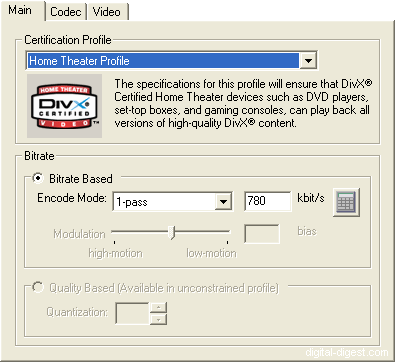
Profiles are pre-programmed settings for the DivX codec that conform to standards set by DivX.com, hence ensuring maximum compatibility with DivX devices. This will make sure your encoded video files are compatible with DivX enabled devices that are available on the market (like standard DVD/DivX players). By turning certification off, the risk is that the file you have encoded will not playback properly on certified DivX devices, and can only be avoided if you knew exactly which settings are supported and not supported by specific certified devices.
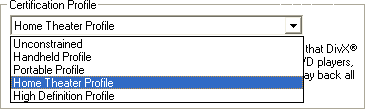
To select a profile, choose a setting from the "Certification Profile" drop down menu.
The four profiles currently available are Handheld, Portable, Home Theatre and High Definition, and a description is provided for them when you select a profile.
If you set the option to "Unconstrained", this will basically allow you to have access to more options, but at the expense of compatibility.
New in DivX 6.2 are "Encoding Presets", which are basically 11 pre-configured settings based on speed and quality. Enabling presets disable the selection of many of the options discussed here as the preset take over the setting controls. No documentation has been provided for the preset though, so doing it the manual way (as described by this guide) is still the best way if you want to control all aspects of the DivX codec.
Choose the type of encoding method for this codec.
1-pass encoding allows you to specify an average bit-rate, which the encoder will try to achieve over the length of the content.
1-pass quality-based encoding is basically constant quantizer encoding (same quantizer used for every frame, and the bit-rate will depend on the complexity of the source), but you specify the quality of the output (using the "Quantizer" slider - the lower the quantizer, the higher the quality), rather than the bit-rate directly. File size, unfortunately, becomes unpredicatable as a result. In previous versions of the DivX Codec, this option was only available when the "Unconstrained" profile is selected. This is because the "Video Buffer Verifier" is disabled in this mode and because of this, the encoded video stream might not be fully compatible with DivX devices (it might still be, but there is no way to tell for certain and hence it was removed from certified profiles) - this is listed and explained in the DivX 5.x user guide, which is still the recommended guide for DivX 6.x (DivX.com FAQ entry). In the latest (6.2.5) version of the codec, all profiles now allow 1-pass quality based encoding (only the "Unconstrained" profile allows for a "fixed quantizer" setting - all others only allow you to set a "target" quantizer, which would allows the codec to encode the video so it is certified for use).
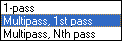
multi-pass is the best encoding option (for smallest file size, and best quality) - multi-pass encoding takes longer than 1-pass encoding : the encoding time is roughly the encoding time of a "1-pass" encoding multiplied by the number of passes (eg. 2-pass takes twice as long, 3-pass takes three times as long ...), but the results may be worth it - multi-pass uses the bitrate you selected as appropriately as possible, to give you both an accurate file size and the best possible looking picture given that bitrate.
DivX 5.0.3 Pro added Nth pass encoding. Previously, only 2-passes were available. Now, you can have as many passes as you want, with each pass giving the DivX codec more information to work with, and hence, achieve a higher quality encoding (at the expense of time, of course). Note that it is very hard to achieve any noticeable quality improvments after 3-passes.
Using Nth pass encoding is similar to using 2-pass encoding : you have a common first pass using the "Multipass - 1st pass", and then subsequent passes can be performed using the "Multipass - nth pass" settings.
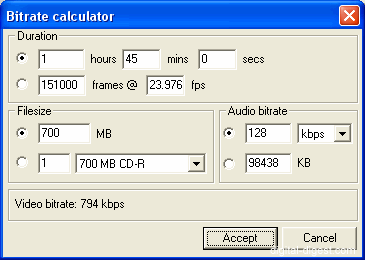
DivX 6 has a built-in bit-rate calculator, which can help you figure out the exact bit-rate you need to ensure the output file is limited to a certain size. The idea here is to provide the length of the video and the audio properties, and then enter a desired file size to get the required bit-rate.
This is the bit rate setting for the video. A setting of 1500 will produce very good quality video (lower will mean a smaller file size, but poorer quality). Don't go below 650 (650-1000 for 1 CD movies), and there is probably not too much point in going over 2000 (1300-2000 for 2 CDs).


 Home
Home