Software - > avi.NET

Main Screen
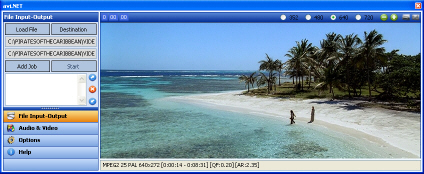
Enlarge Image Enlarge Image: Main Screen

Downloads


Join Our Newsletter
Title: avi.NET
Author/Publisher: Official Website
Ease of use: Not Rated
Latest Version: 3.1.0.0 (details)
OS Support: Windows Me Windows 2000 Windows XP Windows 2003 Windows Vista Windows 7
License: Freeware
Date Added: Dec 20, 2005
Last Updated: Feb 28, 2010
Page Viewed: 66429 times

  Email Updates
email me whenever this software gets updated

Send to Friend   Send to Friend

User Rating:
(5 votes)
Details / Vote Now / Post Your Comments

Summary Links Images Ratings History Tools

Related Forum Threads:

Loading

Downloads:

Download: Official download page Title: Official download page
Link: Download

Description: Download avi.NET from the official site


Description:

From the Official Site:
avi.NET will allow you to load in your ripped VOB file, select your desired options, and convert to AVI, either XviD or DivX, both DivX 5 and 6 are supported. All AVI's made using avi.NET are SAP friendly, whether DivX or XviD codec used. Obviously they'll play just fine on your PC too. I'll now go into more detail about the usage and various options in avi.NET.

avi.NET will accept both MPEG1 or MPEG2 files for input, which includes DVD, SVCD and VCD. Upon loading a file, avi.NET will invoke DGIndex (included) to index the input file and give us the information needed for us to proceed. When our file has finished 'indexing' you'll see the movie start to play/preview.

Categories:

Supported File Formats:

Input Files: DVD, SVCD, VCD, VOB
Output Files: AVI, DivX, XviD

Revision History:

Version 3.1.0.0
  • Release Date: Feb 28, 2010
  • Added direct '*.TS" support as an input file (kind of experimental).
  • Added closed caption support (will read in closed caption files created by index.NET).
  • Added some further options via right-click on preview namely: 'Force 4:3 input to 16:9','Force 16:9 input to 4:3', and three audio volume options (setting remembered between loads): MAX, LOW, MUTE.
  • Updated 'index.NET' which like before it with avi.NET, it has been completely re-written.
  • In doing the above, new code in index.NET has given rise to new code in avi.NET.
  • Altered feedback information and text of display window and tooltips to a more understandable and neater format.
  • Tweaked the subtitle and audio routines.
  • Fixed a couple of spelling mistakes.
  • Altered various 'check' and 'feedback' dialog routines.
  • Changed over to Microsoft Visual Studio 2010 RC.
  • Various other little code clean-ups and changes.
View complete revision history

User Rating:

  Average Rating: Your Rating:
Registered Users: (5 votes)
Non-Registered Users: (30 votes)

User Comments:

SImple easy to use great quality
Posted by: Ezram, 06:55:25, Mar 14, 2006


good
Posted by: hareluya88, 20:24:15, May 9, 2008


good
Posted by: YingYang, 15:52:14, Mar 18, 2009


Sorry, but you must be logged in to use this feature.

Please note that the forum has a separate login/registration system. You will need to sign up and login to the forum separately.

Username:
Password:
Remember Login?
 

Don't have an account? Sign up here
Lost your login/password?
Top 10

Software Submissions