News Articles
Movies Software
DivX, XviD, DVD Subtitles Forum
DigiWiki Codecs

Username:
Password:  
Remember Login?
Sign Up
 

Software - > Dr. DivX

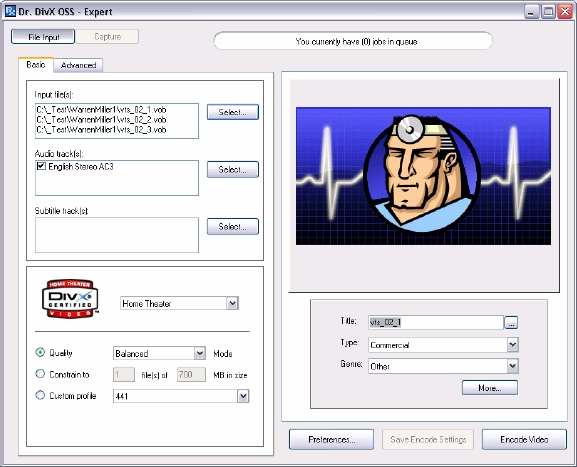
Main Screen
Enlarge Image Enlarge Image: Main Screen

Downloads


Join Our Newsletter
Title: Dr. DivX
Author/Publisher: DivX.com
Ease of use: Not Rated
Latest Version: 2.0.1 Beta 7 (details)
OS Support: Windows 2000 Windows XP Windows Vista
License: Open Source
Date Added: Dec 12, 2005
Last Updated: Feb 3, 2008
Page Viewed: 107253 times

  Email Updates
email me whenever this software gets updated

Send to Friend   Send to Friend

User Rating:
(16 votes)
Details / Vote Now
User Comments:
ibrah_abdllh: hi i'm ibrahim from Saudi Arabia...
More / Post Your Comments

Summary Links Images Ratings History Tools

Categories:

Supported File Formats:

Input Files: AVI, MOV, MPG, VOB, WMV
Output Files: AVI, DivX

Description:

An open source DivX encoding tool that supports various input formats like AVI, WMV, VOB, MPG, MOV, multiple audio and subtitle tracks.

To install, you need to download the Dr. DivX package from the official download page and then download the Required DLLs (drffmpeg.dll and avdsp.dll) and put it in your Dr. DivX directory (default: c:\Program Files\DivX\DR. DivX 2.0 OSS\).

Revision History:

Version 2.0.1 Beta 7
  • Release Date: Feb 3, 2008
  • Fixed AviSynth bug
  • Fixed cropping and resizing related GUI bugs
  • Introduced anamorphic encoding
  • Updated russian translation
View complete revision history

Downloads:

Download: Official Download Page Title: Official Download Page
Link: Download

Description: Download Dr. DivX from the official site


Download: drdivx2-2.0.1-b7-setup.exe Title: drdivx2-2.0.1-b7-setup.exe
Link: Download
Size: 4.08 MB

Description: Download Dr. DivX 2.0.1 Beta 7


Related Articles:

Read Article: YouTube, Google Video Download and DivX Conversion Guide Title: YouTube, Google Video Download and DivX Conversion Guide
Link: Read Article   Essential Reading  

Description: A guide on how to download and play YouTube/Google Video clips and then convert them to DivX/AVI files, all using free software.


User Rating:

  Average Rating: Your Rating:
Registered Users: (16 votes)
Non-Registered Users: (54 votes)

User Comments:

Sorry, but you must be logged in to use this feature.

Please note that the forum has a separate login/registration system. You will need to sign up and login to the forum separately.

Username:
Password:
Remember Login?
 

Don't have an account? Sign up here
Lost your login/password?
Top 10
Features

H.264 Zone: H.264 news, articles and downloads


Software Submissions