Software - > HandySaw DS

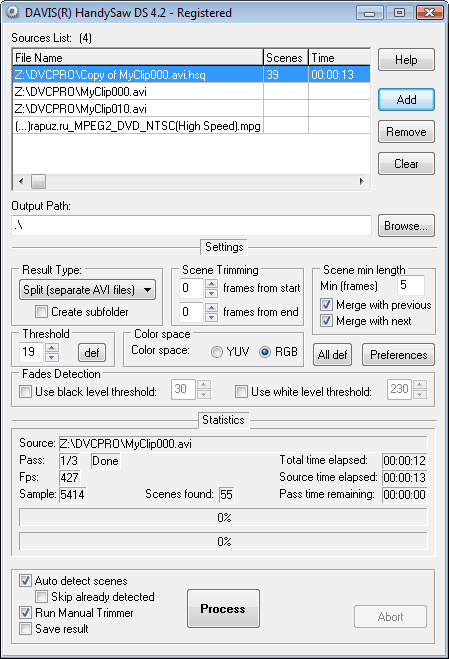
Screenshot
Enlarge Image Enlarge Image: Screenshot

Downloads


Join Our Newsletter
Title: HandySaw DS
Author/Publisher: Davis Software (details)
Ease of use: Intermediate
Latest Version: 4.2 (details)
OS Support: Windows 95 Windows 98 Windows Me Windows 2000 Windows XP Windows 2003 Windows Vista
License: Commercial, €54.95
Date Added: Dec 7, 2005
Last Updated: Dec 24, 2008
Page Viewed: 11817 times

  Email Updates
email me whenever this software gets updated

Send to Friend   Send to Friend

User Rating:

Details / Vote Now / Post Your Comments

Summary Links Images Ratings History Tools

Related Forum Threads:

Loading

Downloads:

Download: Official Download Page Title: Official Download Page
Link: Download

Description: Download HandySaw DS from the official site


Description:

From the Author :
HandySaw is intended to facilitate the job for people who work with nonlinear editing (NLE) software.

To accelerate the digitalization process the source material is usually captured as one or several large pieces; editing in Adobe Premiere with such source files can be rather difficult. Instead of one long clip it would be desirable to have a set of short clips, each one containing one single "scene" (e.g. from the start to the end of recording).

This is the task that can be accomplished by HandySaw DS.

The program offers two methods of detection of scenes in the videofile:
  1. Optical. The program parses content of the videofile, finds scene changes and divides the initial video into separate scenes. For this analysis only videostream data is used; timecodes or any other information are not required. Of course 100% correct results cannot be guaranteed but, on the average, it is rather high.

  2. By time of shooting. Cameras of DV standard and the standards based on DV (DVCAM, DVCPRO), during shooting saves time and date of shooting of each frame of video on a tape. Then if video is transferred in a computer via digital FireWire interface this information is saved in the videofile. If HandySaw finds it then search of scenes is fulfilled with usage of these data. In this case accuracy of detection makes 100 % under condition of absence of a spoilage in initial video.
After or instead of automatic dividing you can verify and divide video in Manual Trimmer.

Categories:

Supported File Formats:

Input Files: ASF, AVI, DivX, DV, MOV, MP2, MP3, MP4, MPG, VOB, WAV, WMV, XviD

Revision History:

Version 4.2
  • Release Date: Dec 24, 2008
  • Windows Vista compatibility improved
  • Several scene naming templates added
  • Several user interface design changes
  • "Split by VirtualDub.js" plug-in improved
  • "Split by ffmpeg.js" plug-in improved
View complete revision history

User Rating:

  Average Rating: Your Rating:
Registered Users:
Non-Registered Users: (2 votes)

User Comments:

Sorry, but you must be logged in to use this feature.

Please note that the forum has a separate login/registration system. You will need to sign up and login to the forum separately.

Username:
Password:
Remember Login?
 

Don't have an account? Sign up here
Lost your login/password?
Top 10
Features

High Definition DVD Zone: Blu-ray/HD DVD news, articles and downloads


Software Submissions