News Articles
Movies Software
DivX, XviD, DVD Subtitles Forum
DigiWiki Codecs

Username:
Password:  
Remember Login?
Sign Up
 

Articles - > Adding Tags to AVI files

Printer Friendly Version Printer Friendly Version

User Rating:
No ratings recorded - Vote Now

User Comments:
Post Your Comments

Categories:

Page 1 of 1: Adding Tags to AVI files

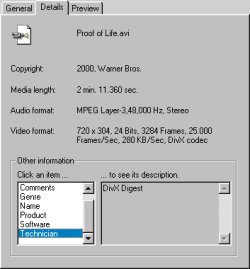
To make your AVI/DivX files more professional looking, we can add in Title/Comment/Copyright info to it that is visible when your right click on the AVI/DivX file and go to the "Details" section.
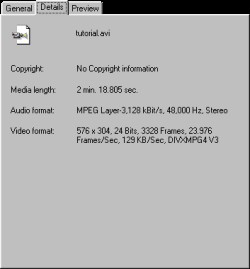
Before
Before adding info
AVI Tags
After adding info
AVI Tags
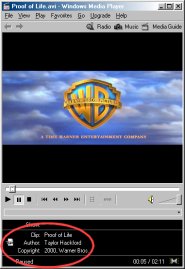
AVI info in Windows Media Player


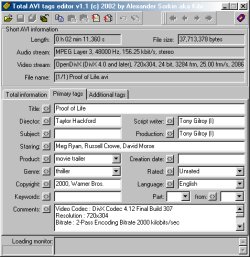
To add these info, we'll need a tool called Total AVI Tags Editor :
  1. Load in your AVI file using the "Open" button (or press CTRL+O)


  2. Go to the Primary Tags and Additional tags section and start adding tags to your heart's content


  3. When you are finished, press the "Save" button (or press CTRL+S)


  4. Done !!


Total AVI Tags Editor


Article Navigation:

Revision History:

Version 1.0:
  • Date Updated: Mar 30, 2002

User Rating:

  Average Rating: Your Rating:
Registered Users: No ratings recorded
Non-Registered Users: (3 votes)

User Comments:

Sorry, but you must be logged in to use this feature.

Username:
Password:  
Remember Login?
Sign Up