

 Home
HomePage 3 of 3: Using Nandub - Splitting/Cutting AVI Files
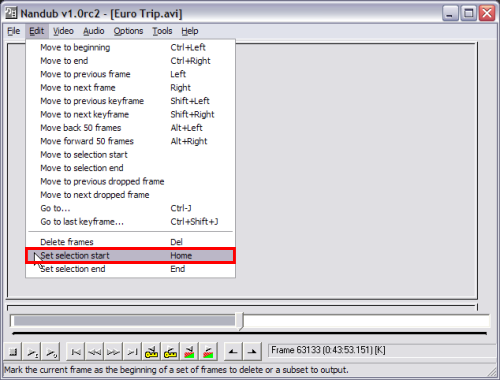
Now that you have "Saved" the first part of the avi file. Its on to saving the second part, which is extremely simple. As soon as it gets done saving the first part, it will return you back to the main Nandub screen. Just click "Edit", then "Set selection start" (for the 2nd avi to start where the first avi ended). (Screen Shot Below)
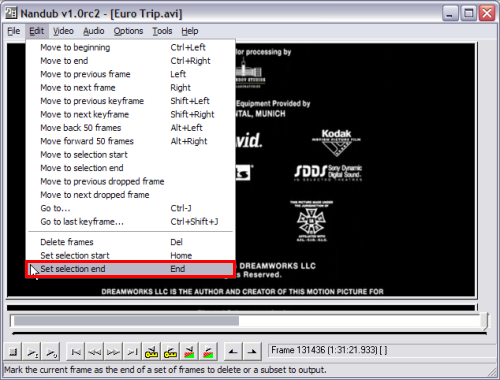
Then drag the slider bar to the end (or where ever you want the 2nd avi to end) and then click "Edit" then click "Set end selection". Then hit "F7" to save it. (Make sure you save it as part 2 of something different than you saved the first avi) (Screen Shot Below)
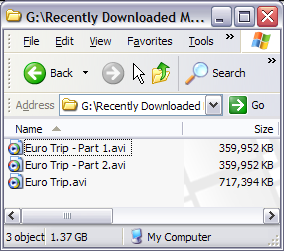
After it gets done, you should have to seperate avi files of the same orginial avi file. (Screen Shot Below)
Then drag the slider bar to the end (or where ever you want the 2nd avi to end) and then click "Edit" then click "Set end selection". Then hit "F7" to save it. (Make sure you save it as part 2 of something different than you saved the first avi) (Screen Shot Below)
After it gets done, you should have to seperate avi files of the same orginial avi file. (Screen Shot Below)

