

 Home
Home


Page 1 of 3: Using Nandub - Splitting/Cutting AVI Files
Software you will need:
Below I will show you how to split/cut your .avi file in to two parts. Very handy if you wish to burn to a CD-R, which only holds max 700MB. There are actually 2 ways of doing this, one with Nandub and the other with the more recently updated VirtualDubMod. The VirtualDubMod method is located here. Instructions for joining AVIs using VirtualDubMod can be found here
Nandub Method
Start up Nandub then click "File" at the top, then "Open video file...", then find your .avi file and load it into Nandub.
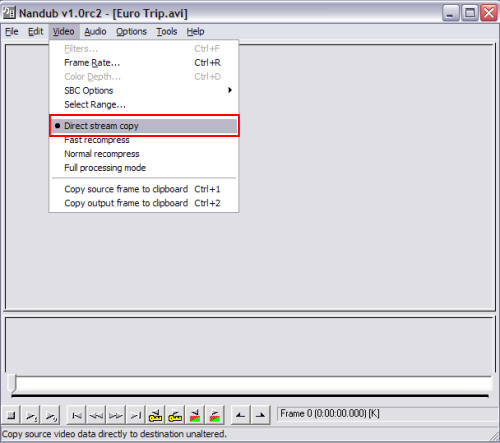
After loading your .avi file, click "Video" at the top, then click "Direct stream copy". (Screen Shot Below)
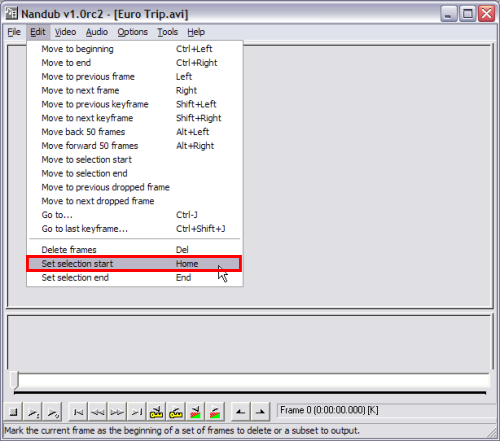
Now click "Edit" at the top, then click "Set selection start". (Screen Shot Below)
Below I will show you how to split/cut your .avi file in to two parts. Very handy if you wish to burn to a CD-R, which only holds max 700MB. There are actually 2 ways of doing this, one with Nandub and the other with the more recently updated VirtualDubMod. The VirtualDubMod method is located here. Instructions for joining AVIs using VirtualDubMod can be found here
Nandub Method
Start up Nandub then click "File" at the top, then "Open video file...", then find your .avi file and load it into Nandub.
After loading your .avi file, click "Video" at the top, then click "Direct stream copy". (Screen Shot Below)
Now click "Edit" at the top, then click "Set selection start". (Screen Shot Below)

