|
Download SubCreator, a subtitle editor with many functions
From the Author :
SubCreator is an all in one subtitle editor!
You can write scripts from scratch, add timings, adjust existing
timings in all possible ways (offset, stretch, duration adjust,...)
You can import script from other formats (time, frame format,
SSA (very strong support), SAMI, SRT.
Then of course you can export it (time, frame format, SSA, SRT).
In general it looks like a combination of a movie player and a
text editor with many synchronization features.
I have put a strong focus on a keyboard use, so you can control
movie flow, text edition and timing edition without need to
use a mouse.
Resolution is 0.1 sec. what should be sufficient in most cases.
There is a complex help system added. Please, please use it :)
Input Files: SRT, SSA
Output Files: SRT, SSA
Windows 95/Windows 98/Windows Me/Windows 2000/Windows XP
Version 1.4.0.150
- Release Date: Dec 13, 2011
- Download(s):
- Improved movie playback. Direct Show support added.
- Added Windows installer (MSI).
- Added MPL2 subtitle format support.
- Corrected Adjust Durations action.
- Replaced Select All keyboard shortcut to a standard Ctrl+A.
- Better control over the very short durations of lines.
- Help system converted to a HTML (runs on Windows 7).
- Fixed saving unsaved data when closing SubCreator.
- Simplified storing default location of movies and scripts.
- Time edit control allows pasting time (accepts different time formats).
- Corrected line swapping action issues.
- Replace dialog wasn't accepting replacement into an empty string. Fixed.
- Improved visual appearance of the main application window.
View complete revision history
|

|
Rate this software:
Your Rating:
You have not voted yet!
Average: 3.29/5
Total Ratings: 22
|
|
|
| |
|
|
|
|

 Home
Home


 subcreator1.4.0.150.zip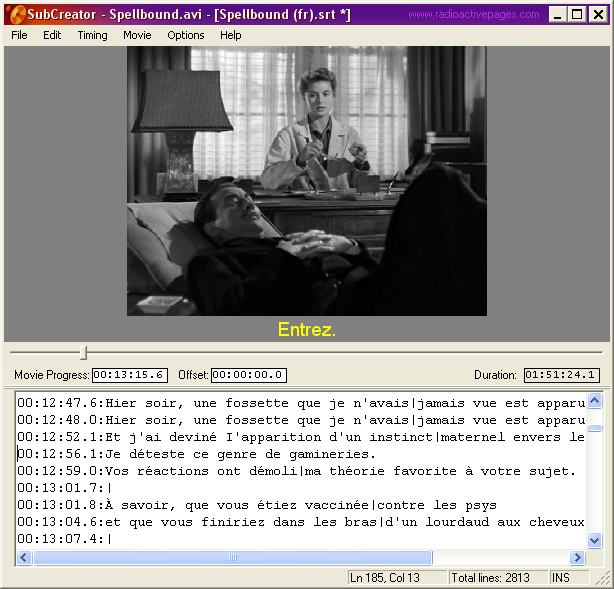
 Syncronizing and merging subtitles into an AVI file
