

 Home
Home


Page 1 of 2: English Version
I'll assume that you have already read Nicky's Subtitle Ripping
Guide (
http://www.divx-digest.com/articles/subrip-mpeg4.html).
You should follow the steps explained in the guide until SubRip
OCR asks for New characters.
(Taken from Nicky's page)
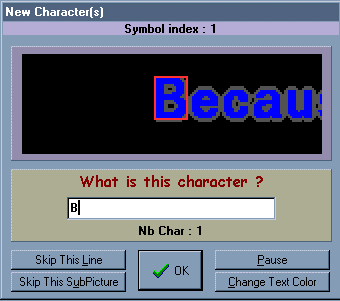
If the letter within the box is non italic answer the correct
letter. If it is italic complete with: <b>, followed by the
shown letter, followed by </b>. For example:
A = A
A = <b>A</b>
B = B
B = <b>B</b>
and so on...
When you finish ripping the subtitles you save the output file like
it es explained in the guide.
Before converting the file to MicroDVD format, open it with any word
processor that supports search & replace (I used WordPad).
The strings that follow should be copied without the quotation marks.
|
Replace |
With |
Comments |
|
"</b><b>" |
"" |
This should delete the string |
|
"</b>" |
"" |
Delete the ones left |
|
" <b>" |
" " |
Notice the space in both strings |
|
"-<b>" |
"<b>-" |
For dialogs |
Search for all the "<b>" strings and delete the ones that are NOT
at the start of the line.
Then spell check the text (using Word or other such tool)
Search for all the "<b>" (they should be all at the beginning of a
line) and replace them with "{y:i}"
When all this is finished go on with the guide and convert the file to microDVD format.
And that's all. You should see italics like in the original DVD.
By Pancho
Thanks to Frata for the corrections
Comments to: divx@uol.com.ar

